Stop Switching Between Tabs. See Your Entire Marketing Performance in One Dashboard.

See your website traffic, Google rankings, ads, conversions, and tracking performance in one place. Find what's changing, spot problems faster, and know exactly what needs your attention.

πŸ‘‡ Live Interactive Command Center Preview (Click tabs to explore)
A
β€’ AIMBRILL β€’SEO COMMAND CENTER

Search Console + GA4 Intelligence

Connected - hello@aimbrill.com
Last 28 days
GSC CLICKSπŸ‘†
1,420
vs prev +320
IMPRESSIONSπŸ‘οΈ
48,900
vs prev +6,450
AVERAGE CTR🎯
2.90%
prev period 2.45%
AVG POSITIONπŸ“
14.2
prev period 18.1
GA4 USERSπŸ‘₯
12,650
sessions 14,870
ORGANIC SESSIONS🌱
4,120
conversions 342
βœ…

Action Center

What to fix next + fix briefs

8 Open Actions
What should I do next?

One prioritized list from GSC + GA4 + website. Fix P0 first. Each item tracks Added / Changed / Solved when Google data improves.

P0striking distanceβ€œshopify upsell app”
Added
2026-08-16
Rank
#4.2
Impressions
14,200/mo
Status
open
Action Brief: Push to Top 3

Add 2 internal links from high-ranking guides and update the H1 tag to capture +420 monthly clicks.

Click any sidebar tab on the left to see live previews of all 8 tabs.Copy AI Prompt to Build This Exact Dashboard

Why SEO Data Is Hard to Diagnose

GSC shows search performance. GA4 shows traffic. Your website holds the real answers, but connecting the dots manually takes too long.

1

GSC Shows Keywords, But No Sales

Search Console shows clicks and rankings, but cannot tell you if the page lost revenue or customers.

2

GA4 Shows Sessions, But No Keywords

Google Analytics shows traffic drops and bounce rates, but hides the search queries and rankings that caused the loss.

3

Website Code & Guesswork

Teams waste 10+ hours every week checking code, titles, content and making changes without knowing what works.
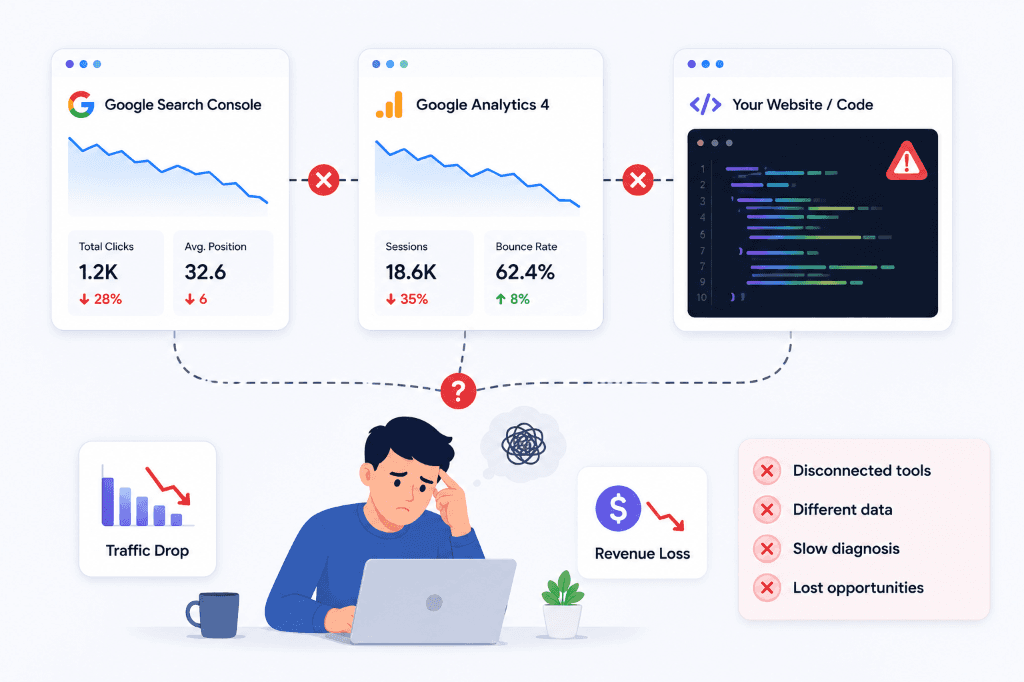
Why SEO Data Is Hard to Diagnose: Disconnected Google Search Console, GA4, and Website Code

The Unified Solution: 8 Purpose-Built Intelligence Tabs

Every tab is engineered to solve a specific data blindspot in seconds, replacing hours of manual CSV spreadsheets with real-time actionable intelligence:

🏠
Executive View

1. Overview

Connects 6 Top KPIs (Clicks, Impressions, CTR, Position, Sessions, Organic Users) and splits Brand vs. Non-Brand search traffic instantly.

βœ“ Solves: Siloed traffic vs revenue overview
βœ…
Automated Fixes

2. Action Center

Prioritized P0/P1 fix briefs with Life Dates Tracking (Added, Changed, Solved) and automated progress status badges.

βœ“ Solves: Guessing what code to fix next
πŸ“…
Day-Over-Day

3. Daily Report

Aligns the latest finalized GSC day with same-day GA4 conversions, spotlighting top daily rising and dropping search queries automatically.

βœ“ Solves: 48h Google Search Console data lag
πŸ“„
URL Normalizer

4. Pages

A single joined table matching GSC impressions and rank with GA4 checkout conversions per URL, with proportional share visual bars.

βœ“ Solves: Broken Excel VLOOKUP formulas
πŸ”‘
Rank Intelligence

5. Keywords

Automatic tier bucketing (Top 3, 4–10, 11–20), rank gainers & losers, and alerts for Striking Distance Queries (Pos 4–15).

βœ“ Solves: Missed low-hanging rank wins
πŸ› οΈ
Code Audit

6. Technical SEO

Crawls and audits meta titles, missing descriptions, broken canonical tags, and indexability errors directly tied to ranking loss.

βœ“ Solves: Hidden technical SEO errors
βš”οΈ
Market Gap

7. Competitors

Monitors commercial comparison landing pages (e.g. /brand-vs-competitor) and captures high-intent competitor search terms.

βœ“ Solves: Competitor keyword gap blindness
πŸ›€οΈ
Full Funnel

8. Traffic Journey

Complete search-to-sale funnel mapping: Search Impression β†’ Google Click β†’ Website Session β†’ Checkout & Conversion.

βœ“ Solves: Fragmented customer journey tracking

Copy This Exact Prompt to Build the Complete Dashboard

Click the button below to copy the complete production prompt. Paste it into your AI coding assistant (ChatGPT, Claude 3.7 Sonnet, Cursor, or Antigravity) to build this exact system:

Full-Stack Dashboard AI Prompt

Production Ready

Paste this prompt into Claude, ChatGPT, Cursor, or Antigravity to build the entire dashboard

You are an expert full-stack TypeScript and Next.js engineer. Build a complete, production-ready **Unified Growth & Marketing Intelligence Dashboard** matching this exact architecture, design system, and tab structure using Next.js 15 (App Router), TypeScript, Google APIs, and Meta Marketing APIs.

---

### Project Overview
A unified local/cloud command center connecting **Google Search Console (GSC)**, **Google Analytics 4 (GA4)**, **Google Tag Manager (GTM)**, **Google Ads**, and **Meta Ads (Facebook/Instagram)** into a single dashboard for organic rankings, paid campaign ROAS, tag tracking integrity, traffic journeys, and automated fix briefs.

---

### Core Tech Stack & Dependencies
- **Framework:** Next.js 15 (App Router) with TypeScript
- **Styling:** Custom CSS design system with CSS variables, sleek dark/light aesthetics, KPI stat cards, badges (`improving`, `declining`, `stable`, `solved`), life-date trackers, share bars, and responsive tables
- **APIs & SDKs:**
  - Google OAuth 2.0 (`googleapis` / `google-auth-library`)
  - Google Search Console API (`webmasters.readonly`)
  - Google Analytics Data API (`analytics.readonly` via GA4 RunReport)
  - Google Tag Manager API (`tagmanager.readonly`)
  - Google Ads API / REST endpoint for campaign performance & ROAS
  - Meta Graph API (Marketing API `ads_read` for Facebook/Instagram Ads spend, impressions, CTR, and ROAS)
- **Data Persistence:** Local JSON token store and daily snapshot cache store (`/data/tokens.json`, `/data/daily-snapshots.json`)

---

### Key Dashboard Tabs & UI Structure

The dashboard component (`DashboardClient.tsx`) must implement these exact tabs:

1. **🏠 Overview (`overview`):**
   - Top KPI Cards: Organic Clicks (`πŸ‘†`), Total Impressions (`πŸ‘οΈ`), Avg CTR (`🎯`), Avg Position (`πŸ“`), GA4 Sessions (`πŸ‘₯`), Paid Ads ROAS (`πŸ’°`).
   - Day-over-day delta badges (+ / - changes).
   - Brand vs. Non-Brand search query traffic split.
   - Blended Revenue breakdown: Organic Search vs. Google Ads vs. Meta Ads vs. Direct.

2. **βœ… Action Center (`actions`):**
   - Prioritized Fix Briefs & recommendations generated from multi-channel data.
   - Each action card includes a **Life Dates Tracker**: `Added`, `Changed`, `Solved`, and status badge (`open`, `improving`, `declining`, `solved`).
   - Cross-channel diagnostic alerts (e.g. *Organic Page 1 Low CTR*, *Google Ads Keyword Cannibalizing Organic #1*, *Meta Ads High CPM / Low Conv*, *GTM Missing Purchase Event*).

3. **πŸ“… Daily Report (`daily`):**
   - Latest finalized GSC day metrics vs. previous day.
   - Same-day GA4 sessions, organic visitors, Google Ads spend, Meta Ads spend, and blended ROAS.
   - Top Rising & Dropping organic queries and paid ad creatives.

4. **πŸ“„ Pages & Landing Pages (`pages`):**
   - Joined table mapping paths across GSC organic rank, GA4 sessions, Google Ads landing page spend, and Meta ad landing page conversion rates.

5. **πŸ”‘ Keywords & Search Queries (`keywords`):**
   - Search queries with search volume/impressions, clicks, CTR, and average position.
   - Paid vs. Organic keyword overlap and striking distance queries (Pos 4–15).

6. **πŸ› οΈ Technical SEO (`technical`):**
   - Website crawl diagnostics, meta tag check (missing titles, descriptions), canonical tag validation, and indexability errors directly tied to ranking loss.

7. **βš”οΈ Competitors (`competitors`):**
   - Keyword gap tracking and comparison page performance (e.g. `/brand-vs-competitor` URLs) capturing high-intent competitor search traffic.

8. **πŸ›€οΈ Traffic Journey (`traffic`):**
   - Complete Search β†’ Site β†’ Conversion funnel visualization showing the journey from initial SERP impression to key event completion.

---

### Environment Variables (`.env.example`)
```env
# Google OAuth 2.0 Credentials (for GSC, GA4, GTM, Google Ads)
GOOGLE_CLIENT_ID=your-client-id.apps.googleusercontent.com
GOOGLE_CLIENT_SECRET=your-client-secret
GOOGLE_REDIRECT_URI=http://localhost:3000/api/auth/callback

# Properties & IDs
GSC_SITE_URL=https://www.yoursite.com/
GA4_PROPERTY_ID=123456789
GTM_CONTAINER_ID=GTM-XXXXXXX
GOOGLE_ADS_CUSTOMER_ID=123-456-7890

# Meta Ads Marketing API
META_APP_ID=your-meta-app-id
META_APP_SECRET=your-meta-app-secret
META_ACCESS_TOKEN=your-meta-user-access-token
META_AD_ACCOUNT_ID=act_1234567890

APP_NAME="Unified Marketing & SEO Intelligence Dashboard"
BRAND_NAME="Your Brand"
SITE_DOMAIN="yoursite.com"
APP_BASE_URL=http://localhost:3000
```
Compatible with Claude 3.7 Sonnet, GPT-4o, Cursor & Antigravity

Visual Setup Guide: Connect GSC & GA4

Follow this step-by-step visual blueprint to connect your Google Cloud credentials, Search Console site, and GA4 property in under 5 minutes:

Step 1 of 6

Create Google Cloud Project & Enable APIs

⏱️ 1 min

1. Open the Google Cloud Console .

2. Select or create your project (e.g. my-seo-dashboard) β†’ Go to APIs & Services > Library.

3. In the search bar, search for β€œgoogle analytics api” and β€œgoogle search console api”, then click Enable:

Google Analytics Data API

Accesses live GA4 traffic, user sessions, active visitors & conversions.

Google Search Console API

Provides access to search queries, clicks, impressions & average rank positions.
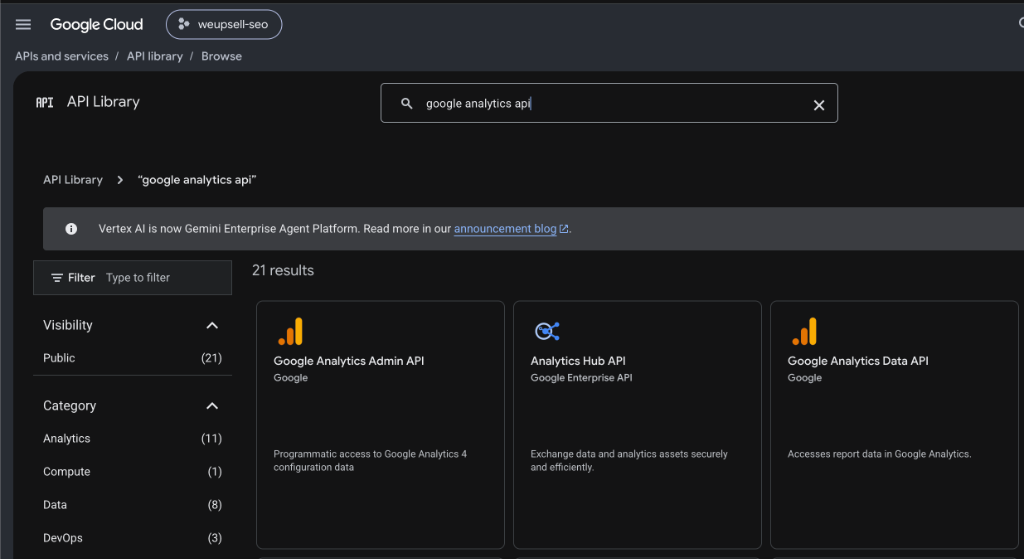
Google Cloud Console: Searching & Enabling Google Analytics Data API in API Library
Expand

Google Cloud Console: Searching & Enabling Google Analytics Data API in API Library

Common Errors & Quick Fixes

Verified solutions for authentication, test user access, and API permission issues

Want Us to Audit Your Store's SEO for Free?

Get a personalized 1-on-1 video audit of your Google Search Console and GA4 traffic leaks from our e-commerce engineers.