

Introduction
Running an online store on Shopify while managing manufacturing or distribution operations in Macola ERP can feel like operating two separate businesses. Your warehouse team lives in Macola. Your sales and customers live in Shopify. And somewhere in between, orders pile up, inventory numbers go stale, and your team spends hours manually re-entering data from one system to the other.
That's exactly the problem PULSE eCommerce was built to solve.
In this blog, we'll walk you through how Macola ERP connects with Shopify using PULSE eCommerce as the integration layer — what it does, how the data flows, and why it's one of the most effective ways for manufacturers and distributors to run a seamless eCommerce operation.
What Is PULSE eCommerce?
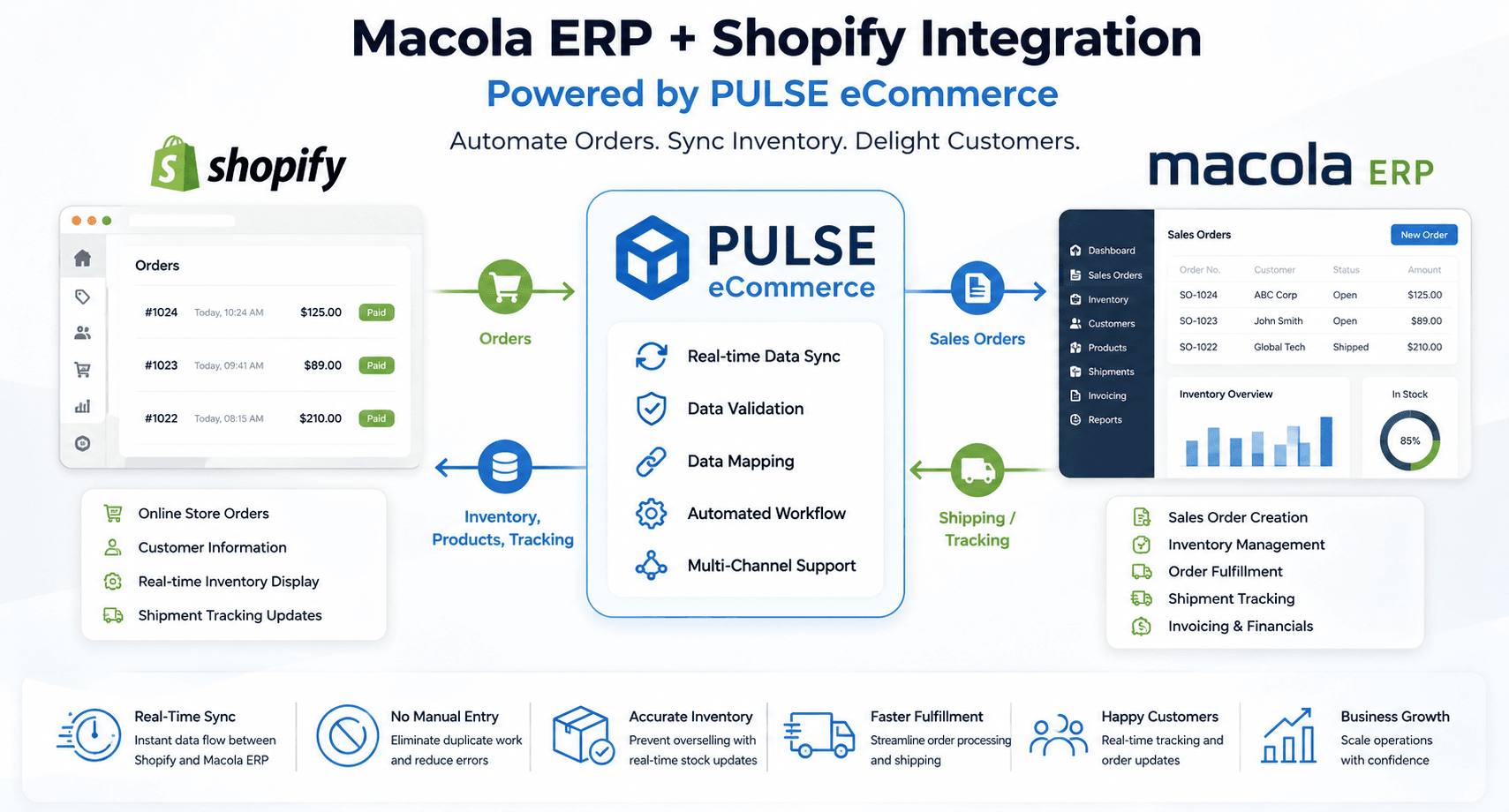
PULSE eCommerce is a purpose-built integration tool designed specifically for Macola ERP users. Unlike generic connectors that try to work with dozens of ERPs, PULSE is built from the ground up with Macola's data structure in mind — which means faster setup, fewer mapping errors, and deeper integration.
It acts as a middleware bridge between Shopify (your online storefront) and Macola (your back-office ERP), automating the flow of orders, inventory, customer data, shipment tracking, and payment information between the two systems — without any manual effort.
Key capabilities of PULSE eCommerce include:
- Automatic import of Shopify orders into Macola
- Real-time inventory sync from Macola back to Shopify
- Shipment tracking updates pushed to Shopify customers
- Customer and product data synchronization
- EDI document handling (Purchase Orders, ASNs, Invoices)
- Support for multiple sales channels including Amazon and Walmart
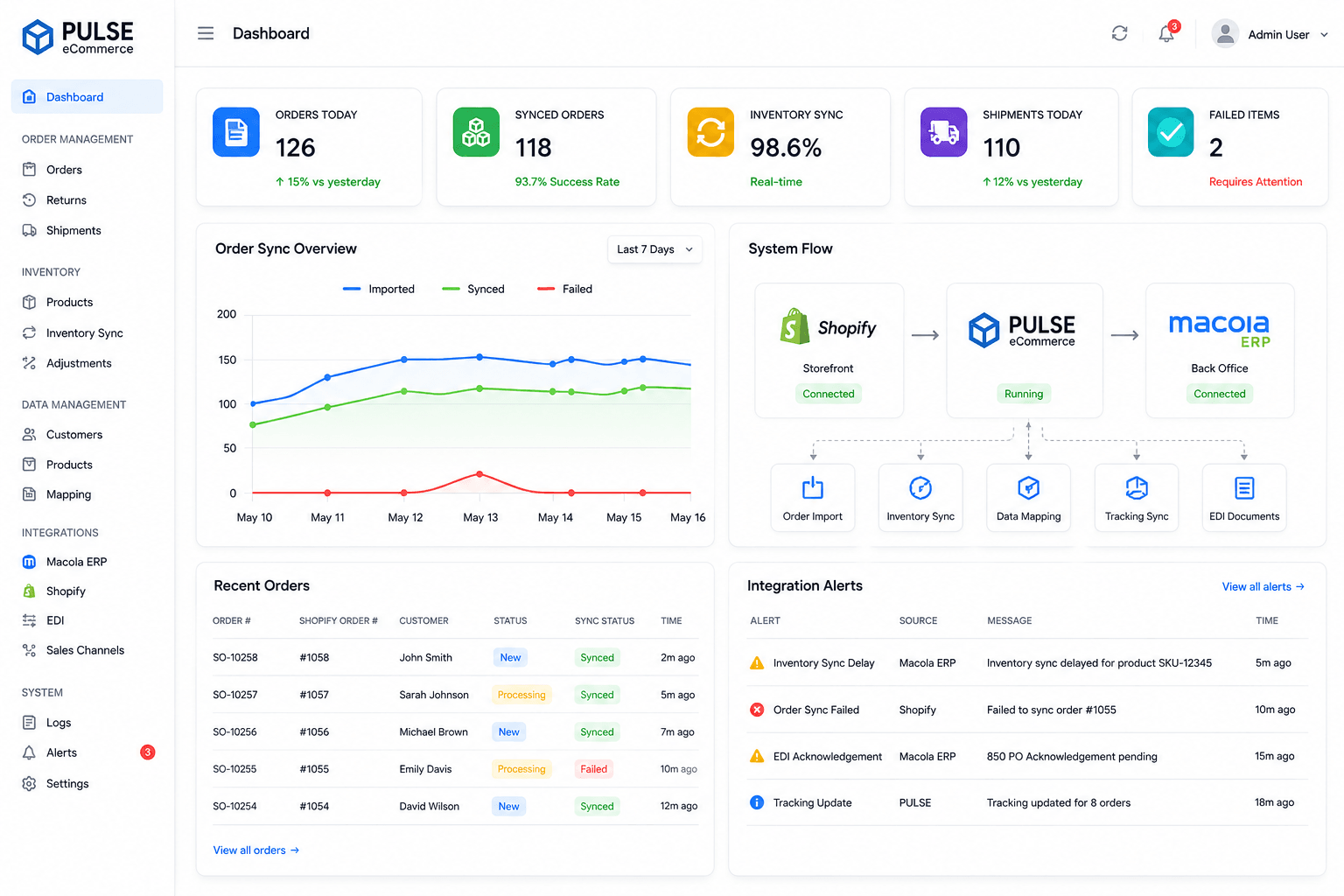
The Problem It Solves: Why Manual Sync Doesn't Work
Before integrating Macola and Shopify, many businesses rely on manual processes:
- Someone exports orders from Shopify as a CSV
- Another person re-enters them into Macola
- Inventory is updated manually — sometimes once a day, sometimes less
- Customers receive no real-time tracking updates
- Mistakes happen. Orders get lost. Stock numbers go wrong.
This approach breaks down fast — especially as order volumes grow. A business processing 50 orders a day can manage it (barely). At 500 orders a day, it's chaos.
PULSE eCommerce eliminates this entirely by automating every data exchange between the two platforms.
How the Integration Works: Step-by-Step Data Flow
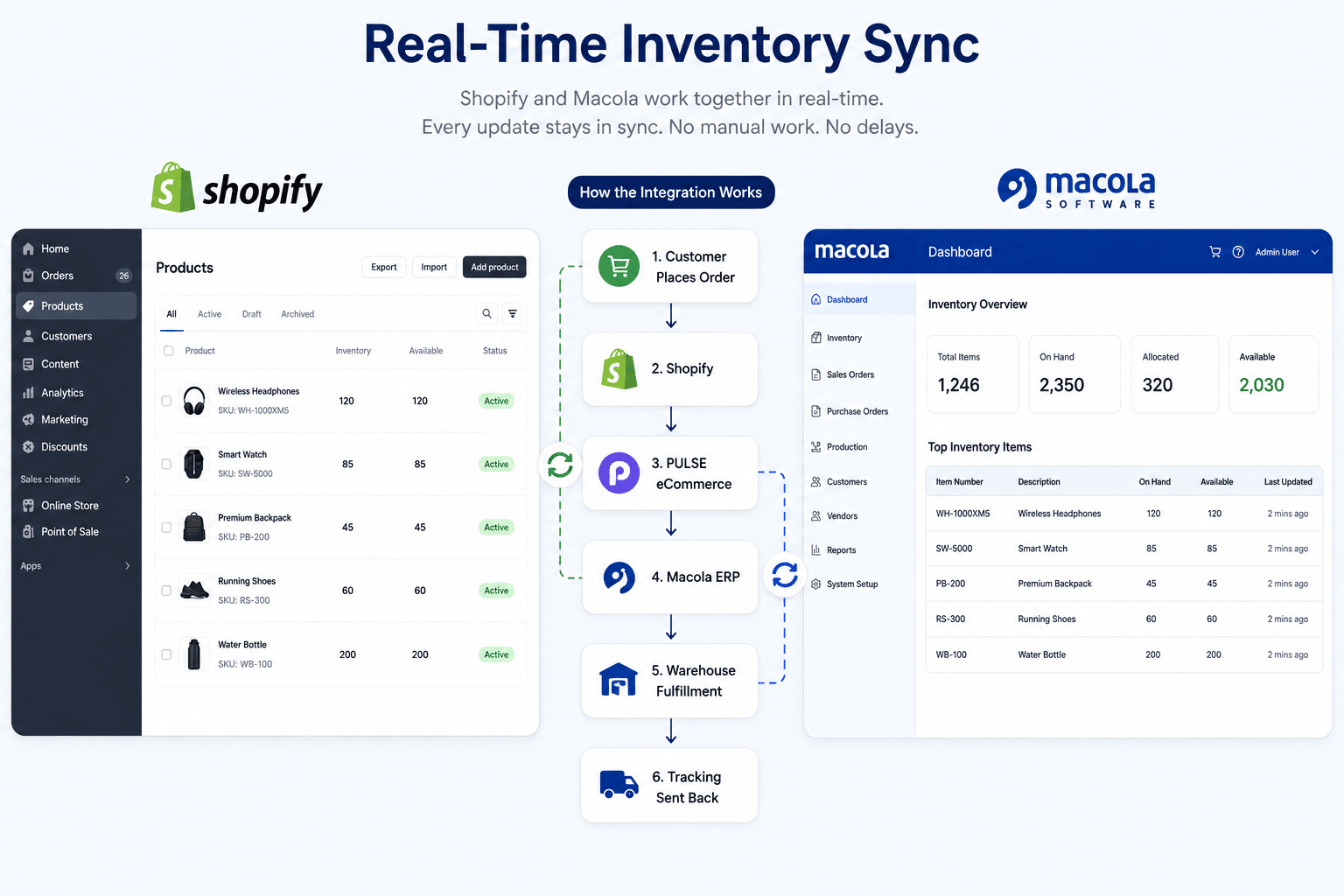
Here's exactly what happens from the moment a customer places an order on your Shopify store to the moment it's fulfilled and tracked in Macola:
Step 1: Customer Places an Order on Shopify
A customer visits your Shopify store, adds products to the cart, and completes checkout. At this point, Shopify holds the order with all customer details, line items, quantities, shipping address, and payment status.
Step 2: PULSE eCommerce Picks Up the Order
PULSE monitors your Shopify store continuously. As soon as a new order is detected, PULSE pulls it from Shopify, validates the data (checks for missing fields, format errors, duplicate orders), and queues it for import into Macola. Invalid or incomplete orders are flagged — not blindly pushed — which keeps your Macola data clean.
Step 3: Order Is Created in Macola ERP
The validated order is automatically created as a Sales Order in Macola. This includes:
- Customer information (new customers are created automatically)
- Product line items mapped to Macola item numbers
- Pricing, discounts, and taxes
- Shipping method and address
- Payment details
Your warehouse and operations team now sees the order in Macola — ready for picking, packing, and fulfillment — without anyone having to type a single thing.
Step 4: Inventory Is Reserved and Updated
Once the order is created in Macola, inventory is immediately reserved for those items. PULSE then pushes the updated inventory levels back to Shopify — so your storefront always reflects accurate stock. No more overselling. No more "Sorry, we're actually out of stock" emails to customers.
Step 5: Order Is Fulfilled in Macola
Your team processes the order in Macola as they normally would — pick, pack, ship. Once the shipment is created and a tracking number is generated in Macola, PULSE automatically captures it.
Step 6: Tracking Information Is Pushed to Shopify
The shipment tracking number and carrier details are sent back to Shopify, which automatically notifies the customer via email. The order status in Shopify updates to "Fulfilled" — all without any manual steps.
Step 7: Financial Data Is Synced
Sales data, invoices, and payment confirmations flow back into Macola's financial module, keeping your accounting accurate and up to date in real time.
What Data Gets Synced Between Macola and Shopify?
Here's a quick overview of the data that PULSE eCommerce keeps in sync:
| Data Type | Direction | Details |
|---|---|---|
| Orders | Shopify → Macola | Order number, line items, quantities, pricing |
| Customers | Shopify → Macola | Name, email, billing/shipping address |
| Inventory Levels | Macola → Shopify | Real-time stock quantities per SKU |
| Product Data | Macola → Shopify | Item descriptions, SKUs, pricing |
| Shipment Tracking | Macola → Shopify | Carrier, tracking number, estimated delivery |
| Invoice/Payment | Macola → Shopify | Payment confirmation, invoice records |
Key Benefits of Connecting Macola + Shopify via PULSE
1. Zero Manual Data Entry
Every order that comes in from Shopify lands directly in Macola — no copying, no spreadsheets, no human error. Your team focuses on fulfillment, not data entry.
2. Real-Time Inventory Accuracy
Inventory levels in Shopify reflect what's actually available in your warehouse — updated automatically every time a sale is made or stock is received in Macola. This prevents overselling and improves customer trust.
3. Faster Order Processing
Since orders don't wait for manual import, your warehouse team can start picking and packing immediately after a customer places an order — dramatically reducing fulfillment times.
4. Fewer Errors, Happier Customers
Manual data entry has an error rate of around 4–5%. Automated integration brings that close to zero. The result? Correct orders, correct tracking, and fewer customer complaints.
5. Built Specifically for Macola
Unlike generic connectors, PULSE understands Macola's data structure natively. Item numbers, customer codes, warehouse locations, price levels — everything maps correctly without complex custom configuration.
6. EDI Support Out of the Box
For businesses that also deal with large retail trading partners, PULSE handles EDI documents like Purchase Orders (850), Order Acknowledgments (855), Advance Ship Notices (856), and Invoices (810) — all within the same platform.
Multi-Channel Support: Beyond Just Shopify
One of the strongest advantages of PULSE eCommerce is that it's not limited to Shopify. The same integration layer supports multiple marketplaces and channels, including:
- Amazon — sync Amazon orders into Macola automatically
- Walmart Marketplace — manage Walmart orders through Macola
- B2B eCommerce — handle wholesale orders alongside direct-to-consumer
This means your Macola ERP becomes the single source of truth for all order and inventory data — regardless of which channel the sale came from.
Who Is This Integration Best For?
The Macola + Shopify + PULSE eCommerce setup is ideal for:
- Small to mid-sized manufacturers who sell finished goods directly to consumers via Shopify
- Wholesale distributors managing both B2B and B2C orders
- Businesses scaling their eCommerce channel and outgrowing manual order management
- Operations teams tired of reconciling Shopify and Macola data at the end of each day
If your team currently spends more than a few hours a week manually moving data between Shopify and Macola, PULSE eCommerce will give you that time back — and then some.
Common Challenges and How to Handle Them
Even with a well-built integration, there are a few things to plan for:
1. SKU / Item Number Mapping Shopify uses product handles and variant SKUs. Macola uses item numbers. Make sure your Shopify SKUs match your Macola item numbers exactly before going live — this is the most common source of import errors.
2. Customer Deduplication If a customer has ordered before (maybe via phone or B2B), PULSE will need to match them to an existing Macola customer record. Set up clear matching rules (by email or customer code) to avoid creating duplicate customer records.
3. Tax and Pricing Rules Shopify handles taxes and pricing at the storefront level. Macola may have its own price levels and tax codes. Ensure your tax zones and price lists are aligned in both systems before going live.
4. Testing Before Launch Always run a full end-to-end test with real orders in a staging environment before switching on the integration in production. Test edge cases: out-of-stock items, partial shipments, refunds, and cancelled orders.
Final Thoughts
Connecting Macola ERP with Shopify using PULSE eCommerce is one of the most impactful things a manufacturing or distribution business can do to streamline its eCommerce operations. The days of manual order entry, stale inventory numbers, and delayed tracking updates are over.
With PULSE handling the data pipeline between Shopify and Macola, your team gets to focus on what actually matters — building great products, serving customers, and growing the business.
If you're currently running Macola and thinking about scaling your Shopify channel — or if you're already doing it manually — PULSE eCommerce is worth a serious look.